From a notice to a recitation video
Six phone clips — mixed resolutions, one of them portrait — became a 1:57 landscape recitation video: a script drafted to a length budget and split into five shots from the notice, shots re-ordered to the narration, the portrait clip rescued without stretching, Chinese subtitles burned in line by line, and road noise pulled out from under the voice.
The finished cut
1:57 · 1280×720 · 22 MB · subtitles, music, title and end cards
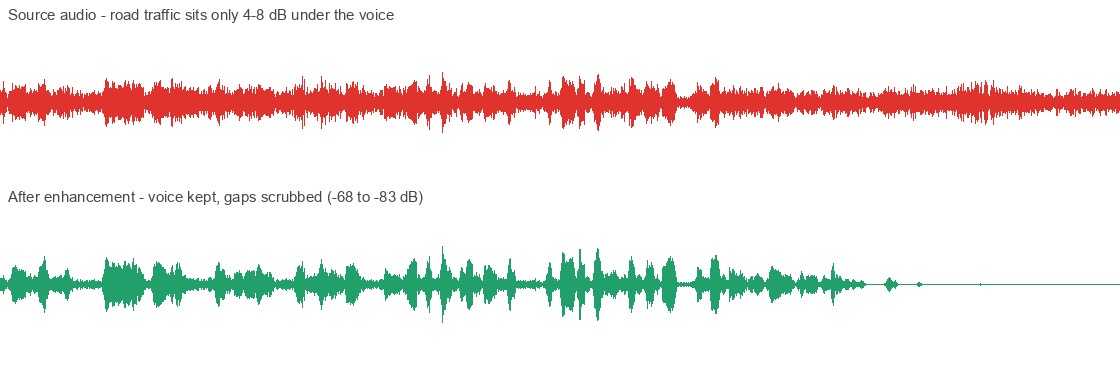
Noise removal, A/B
20 s, alternating: voice, voice, room tone, room tone — source, processed, source, processed
Three traps in the footage
The task
A school Young Pioneer activity asked for a recitation video under two minutes, shot landscape — a third-grader telling the story of a red heritage site. The notice set the constraint; Xiaohe turned it into a plan. A two-minute limit is roughly 305 characters of Mandarin, so the narration was drafted to that length budget, split into five shots, each with framing notes and camera hints for the monument, the tomb and the pavilion — ready to take on location.
What came back were six phone clips, and the plan met its test. Some matches were easy — a good first take lined up with its shot; others needed the shots re-ordered to follow the narration rather than the shooting order, or an extra cut trimmed so the story fit the limit.
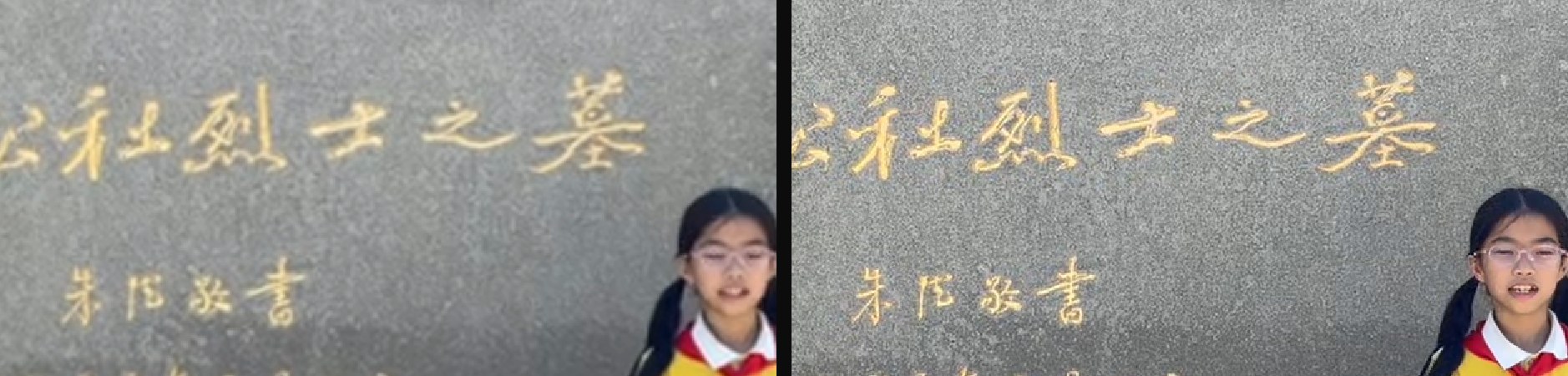
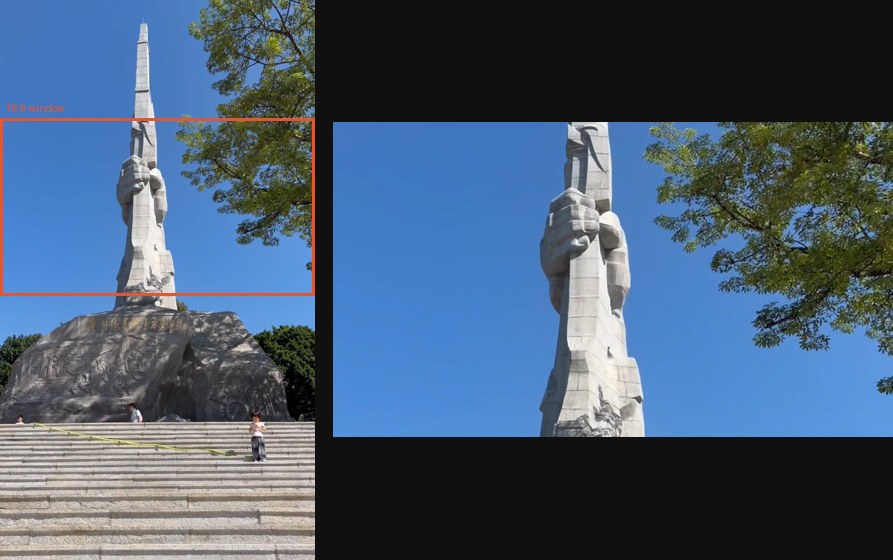
Three things would have wrecked a naive cut. The clips were 568×320 — squeezed once already by the messaging app — so a 720p export would be mostly invented detail. One clip was portrait, stored as a landscape file with a rotation flag; stretching it into 16:9 would have squashed the whole frame. And the memorial park sits beside a busy road: measured against the child’s own voice, the traffic was only 4–8 dB down, which is why "just denoise it" is not a one-line answer.
Xiaohe filled the gaps in the plan and the footage together. It kept a good take where it landed and re-ordered the rest to follow the narration; for the portrait clip it cut a 16:9 window that eases upward with the camera tilt, so the monument settles against open sky instead of leaving two-thirds of the frame to blurred filler. Subtitles were rendered as transparent overlays and composited per line, because the local ffmpeg has no libass; the road noise went to a speech-enhancement model. When a clearer copy of the footage turned up, the whole cut was rebuilt on it.
Two calls were not technical. Asked to regenerate the narration in the child’s voice, Xiaohe declined and said why: the sanctioned TTS path has no voice cloning, the video shows her speaking so a synthesized track would break lip sync, and an assignment about her own recitation should be her own performance. It also checked every fact in the script against public sources — who wrote the inscription, the dates and numbers, the pavilion’s name — and left the table for a parent to verify. The final cut is 22 MB, down from 38 MB once the bitrate was matched to what the source could actually support.
How Xiaohe did it
1. Turn the notice into a script
The notice’s "under two minutes" is the binding constraint, so it was converted into a length budget: about 305 characters, five shots, each with framing notes and camera hints.
2. Pull the material
The activity notice came through WeChat as a PDF; six clips sat in a folder with meaningless hash names. Both were filed under the child’s school folder with readable names.
3. Probe every clip
Probing found mixed resolutions, mixed frame rates, and one clip carrying rotation=-90 — a portrait video hiding in a landscape container.
ffprobe -show_entries stream=width,height,side_data_list
4. Measure where the voice actually is
Frame-level energy over each clip plus word-level timestamps. The first attempt guessed a speech span starting at 1.0 s when her opening word is at 0.00 s, which put the first second of narration under heavy suppression — the fix was to trust the measured boundaries.
whisper --word_timestamps True
5. Rescue the portrait clip
Instead of padding it with blurred filler, cut a 16:9 window and ease it up in step with the camera’s tilt, so the hand-and-rifle carving lands against open sky.
crop=w=720:h=405:y='875-605*(1-cos(PI*min(1\,t/7.0)))/2'
6. Burn the subtitles without libass
This ffmpeg build has no libass and no freetype. Each line is rendered to a transparent PNG with Pillow and composited on its own time window, which also made the timing frame-exact — a concat-demuxer overlay track drifted about a second before that.
overlay=0:0:enable='between(t,3.20,7.20)'
7. Get the noise out from under the voice
Four approaches were measured, not guessed: ffmpeg spectral subtraction, noisereduce, DeepFilterNet and MossFormer2, each scored on the speech-to-gap ratio of the same clip. DeepFilterNet won, and then the real find — its attenuation limit was never set, so it was suppressing the voice along with the noise. Capping it inside speech and leaving it uncapped in the gaps took the ratio from 8.4 dB in the source to 40.5 dB, with the voice attenuated by only 4.1 dB.
enhance(model, df_state, audio, atten_lim_db=12)
8. Match the bitrate to the source
A first export spent most of its bits encoding detail that upscaling had invented. A CRF ladder scored against SSIM picked the point where the file drops 63% with no visible loss — 38 MB to 14 MB on the soft source, 22 MB once genuinely sharper footage replaced it.
9. Deliver, with the checks attached
The script ships with a fact-check table citing public sources for each claim, and the sources are laid out so a parent can confirm them rather than take them on trust.
Skills used
- mywechat
- ffmpeg
- Whisper · word-level timestamps
- DeepFilterNet
- Pillow · subtitle rendering
- mytoolkit · convert
Deliverables
More works
Real tasks, from the terminal to a finished document.